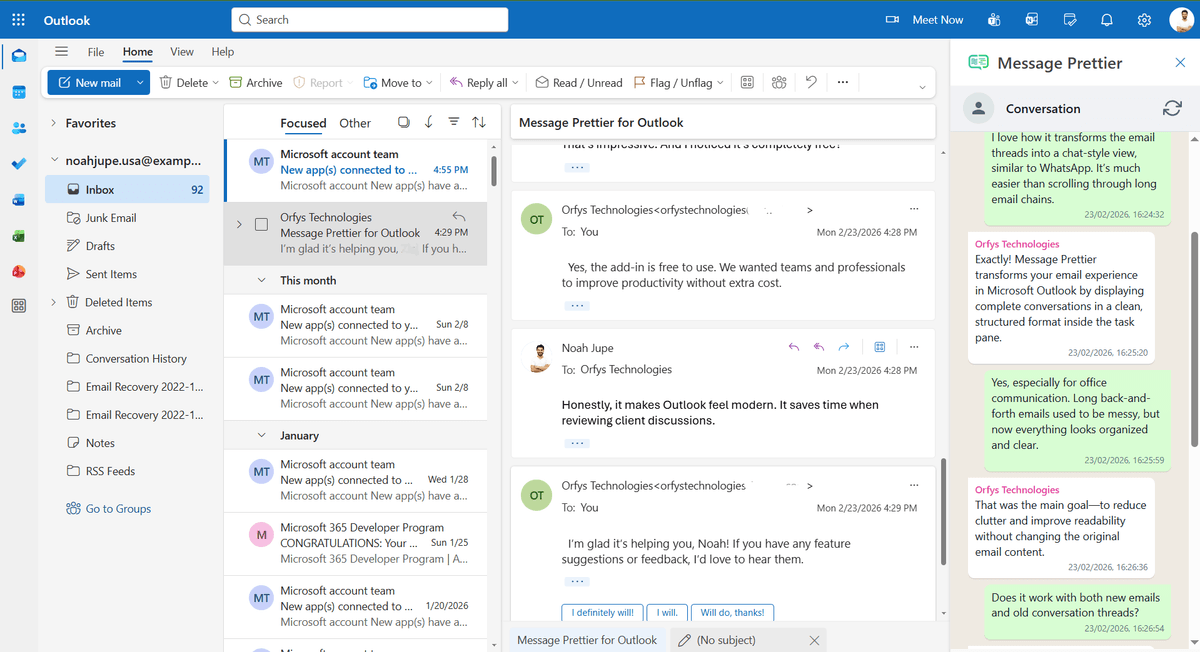
Main Chat Interface
Click image to inspect features
Message Prettier
View your Outlook email conversations in a clean, WhatsApp-style chat interface inside the task pane.
Key Features
- WhatsApp-style conversation layout
- Clean and distraction-free message formatting
- Organized chronological message flow
- Improved readability for long email threads
- Works inside the Outlook task pane
- Works with modern Outlook clients
Message Prettier details
Technical specifications
- • Runs in modern Outlook on Microsoft 365: Windows, Mac, and Outlook on the web
- • Built on the Office JavaScript API (Office.js), so there is no VBA and nothing to install on each machine
- • Installs from Microsoft AppSource and opens in the Outlook reading pane
- • Only reformats the open conversation in the task pane; it never edits, moves, or deletes your actual emails
Support & updates
- • Free to use, with no licence key or subscription
- • Email support at info@msofficeaddin.com, answered on a best-effort basis
- • Improvements ship automatically through AppSource, so you always run the current version
- • Works on any Microsoft 365 plan that allows Outlook add-ins
Frequently asked questions
Does Message Prettier work in Outlook on the web?
Yes. Message Prettier runs in Outlook on the web (OWA), Outlook desktop on Windows, and Outlook on Mac. It uses the Office.js add-in API which supports all three clients.
Will it change my email signature?
No. Message Prettier detects and skips the signature block. Only the email body above the signature is formatted.
Is it available on Microsoft AppSource?
Yes. Message Prettier is AppSource certified and available to install directly from the Microsoft AppSource marketplace or from within Outlook.
What Outlook versions does it support?
Message Prettier supports Outlook 2016 and later on Windows, Outlook 2016 and later on Mac, and Outlook on the web. It requires a Microsoft 365 or Office 2016 subscription.
Do I need admin rights to install Message Prettier?
For personal use, no: install it from AppSource or from Insert, Get Add-ins inside Outlook with a standard Microsoft 365 account. Some organisations restrict add-in installation by policy; in that case your IT admin can deploy it centrally from the Microsoft 365 admin center.
What permissions does the add-in ask for, and why?
It requests read access to the currently open email conversation, which is what it reformats into the chat view. It cannot send mail, change mailbox settings, or access messages you have not opened in the reading pane.
Who is Message Prettier for?
Anyone who reads long threads all day. Support teams untangling multi-reply customer conversations, salespeople scanning a deal's history before a call, and project staff who inherit forty-message chains get the most out of it. If your threads rarely pass two or three replies, native Outlook probably serves you fine.