FinanceIQ Analytics: Data Analysis Tools in Excel
AI-style financial analysis, forecasting, and one-click reporting inside Excel, bringing decision-ready data analysis tools in Excel into a single task pane.
Demo Video
The Challenge
Finance teams and analysts live inside Excel, but Excel stops at raw numbers, and turning those numbers into a decision-ready summary stays manual, fragmented, and slow. Every reporting period someone recalculates totals, growth rates, and margins by hand, then writes the executive summary from scratch. Building a credible 3, 6, or 12-month forecast with best, worst, and expected scenarios usually demands specialist skill, complex formulas, or a separate BI tool. Then reporting means context-switching: copying figures out of the spreadsheet into Word or PowerPoint and rebuilding the layout by hand. Most analytics platforms pull data away from Excel entirely and force an export, upload, and reimport loop, so analysts lose hours to low-value formatting before anyone can actually decide anything.
Our Solution
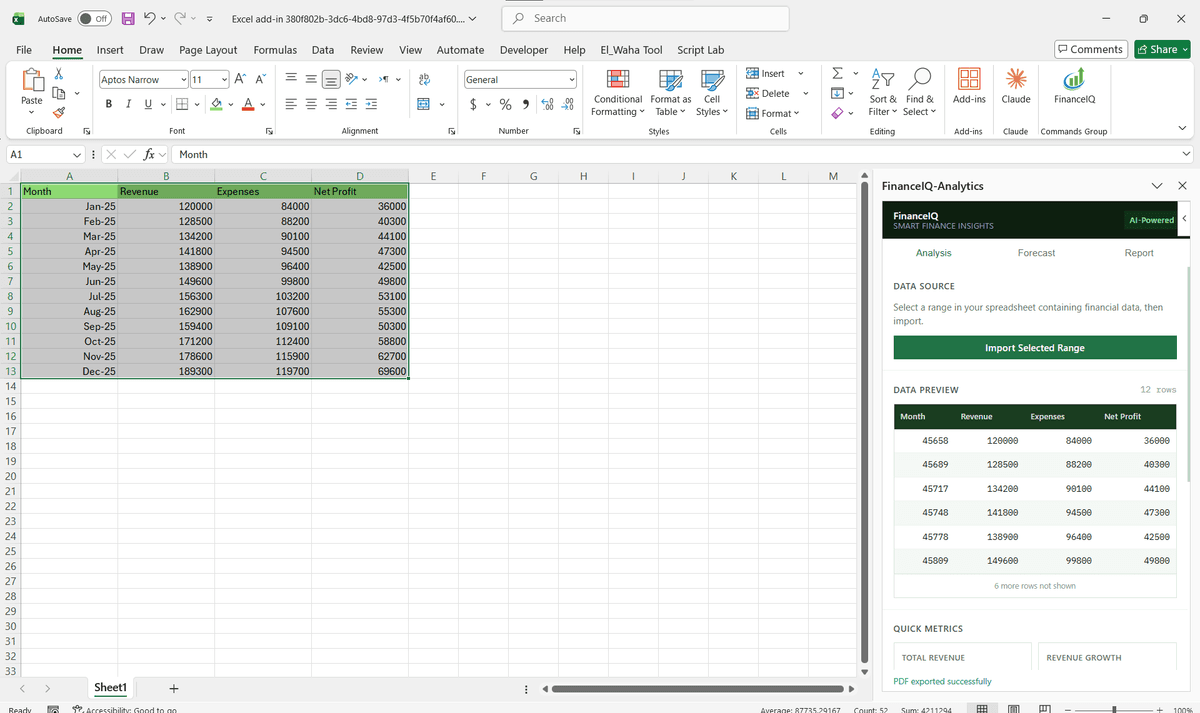
FinanceIQ Analytics is an Excel add-in that runs the full analyze, forecast, and report pipeline inside the spreadsheet using the Office.js Excel JavaScript API. The user selects a financial data range and the add-in reads it, auto-detects the key metrics (revenue, expenses, profit, growth %) from arbitrary column layouts with no manual mapping, and generates a streaming executive summary. It then builds scenario forecasts across 3, 6, or 12 months in base, optimistic, and pessimistic cases, rendered as a custom SVG line chart with a ±8% confidence band alongside its assumptions and risk factors. A single click writes the forecast back as a fully formatted new worksheet (styled header, currency formatting, alternating row shading, and an assumptions block), and the Report tab produces a multi-section document with live preview and one-click export to Word .docx and a branded PDF. The interface uses Excel-native green theming so it reads like a first-party feature, and three shared-state tabs (Analysis, Forecast, Report) mean data imported once flows through the whole pipeline. The intelligence layer is AI-ready by design: it runs a deterministic local model fully offline today, and a live LLM endpoint can plug into aiService.js by swapping three function bodies, so the same workflow that would power an openai excel plugin switches on without reworking the UI. Two technical decisions defined the build. The first was making the intelligence layer deterministic and local instead of calling a hosted model from day one: a finance demo cannot stall on an API key, and analysts evaluating the tool needed identical outputs for identical inputs, so the analysis engine runs offline with the LLM path isolated behind three swappable functions in aiService.js. The second was rendering forecasts as hand-built SVG rather than pulling in a charting library. Chart libraries fight the task pane's narrow width and add bundle weight; a purpose-built line chart with the confidence band drawn directly kept the pane fast and the visual exactly to spec. Column auto-detection was the riskiest piece, so it was tested against real-world workbook layouts rather than idealised samples.
Want the same for your team? Talk to our custom Excel add-in development team. You can also explore our AI-powered Office add-ins.
Key Results
- Replaces a manual analyze, forecast, copy, and reformat workflow that spanned Excel plus Word and PDF with one in-spreadsheet pipeline
- Runs fully offline with zero configuration, so the add-in sideloads straight from its Office Add-in manifest and demos instantly with no API setup
- Adapts to arbitrary financial layouts (Revenue, Sales, or Income; Expenses, Cost, or COGS; Profit, Net, or EBITDA) through automatic column detection, removing manual data mapping
- Consolidates an excel automation add-in, a forecasting tool ranking with the best excel add ins for financial modeling, and a report builder into one task pane that exports to Word .docx and branded PDF
Screenshots
Technologies Used
Areas of Work
Have a Similar Project?
Tell us what you need and get a free technical consultation within 24 hours.
Get a Free Quote