
Excel Add-ins Development
MSOfficeAddin specializes in excel add-in development using Office.js, React, and TypeScript, building production-grade Excel extensions, data analysis tools in Excel, and automation add-ins for enterprise teams worldwide. From custom excel ribbon customization that puts your most-used business logic one click away, to API-connected task panes that pull live figures from your ERP without leaving the spreadsheet, every solution is cross-platform, AppSource-certified, and built to scale.
Excel Add-ins Development Overview
MSOfficeAddin is a specialist excel add-in development company serving enterprise clients across the US, UK, Australia, and worldwide. We build custom Excel extensions using the Office JavaScript API (Office.js), React, and TypeScript, delivering data analysis tools in Excel, workflow automation, and productivity solutions that go far beyond what legacy macros and VBA can achieve. For teams that turn spreadsheets into live dashboards and reports, we connect Excel to your analytics stack through Power BI integration.
Our Excel add-ins are built cross-platform from day one, Excel for Windows, Excel for Mac, Excel Online, and Excel on iPad, so your team accesses the same tool regardless of device or location. Every engagement runs from initial discovery through AppSource certification and post-launch Microsoft 365 compatibility updates. Need help getting listed? We run AppSource submission and certification as a managed service — see our AppSource publishing service. For AI and OpenAI features in Excel, see our AI-powered Office add-in service.
A 40-person accounting practice came to us after their month-end close stretched past four working days. Three staff spent most of that time exporting trial balances from QuickBooks, pasting them into a master workbook, and repairing the formatting that broke along the way. We built them a task pane tool that pulls client balances straight into their reporting templates using the same connection pattern as our QuickBooks integration work, maps accounts automatically, and flags rows that changed since the last close. The close now takes a day and a half, and the partners review numbers on day two instead of day five. The interesting part was not the data plumbing. It was the mapping table the practice manager edits herself, which means new clients get onboarded without a change request to us.
This service fits teams that live in spreadsheets and need them connected to real systems. It is the wrong choice if your workbooks are mostly static documents that get filled in once and archived; document generation in Word usually solves that better. It is also overkill when a Power Query connection already covers your refresh needs. We will tell you that in the first call rather than scope a build you do not need. For a worked example of a spreadsheet analysis build, the FinanceIQ Analytics case study shows one end to end.

Excel Add-ins Development Expertise
Our Excel Add-ins Development Means:
- Office.js architecture and cross-platform compatibility
- Excel ribbon customization and Fluent UI task pane design
- Custom Functions and UDFs (User Defined Functions) for native spreadsheet formulas
- Multi-workbook data consolidation and live API feeds
- OpenAI and Azure AI integration for in-cell data analysis and commentary
- AppSource certification and M365 Admin Center deployment
Custom Excel Add-ins Development Services
Data Analysis Add-ins for Excel
Enterprise-grade data analysis add-ins for excel solutions built on the latest Microsoft frameworks.
Financial Reporting & Automation Add-ins
Enterprise-grade financial reporting & automation add-ins solutions built on the latest Microsoft frameworks.
Excel Ribbon Customization
Enterprise-grade excel ribbon customization solutions built on the latest Microsoft frameworks.
API, ERP & CRM Connector Add-ins
Enterprise-grade api, erp & crm connector add-ins solutions built on the latest Microsoft frameworks.
AI and OpenAI-Powered Excel Add-ins
Enterprise-grade ai and openai-powered excel add-ins solutions built on the latest Microsoft frameworks.
Types of Excel Add-ins Development We Build
Office.js Development
Full-stack add-in engineering on Microsoft's modern JavaScript API, cross-platform on Windows, Mac, and Excel Online, with zero local installation for end users.
Excel Ribbon Customization
Custom tabs, command groups, and contextual buttons built to Fluent UI spec, your most-used business actions always one click away in Excel's native toolbar.
Real-time Data Feeds
Stream live figures from REST APIs, SQL databases, CRM systems, and ERPs directly into cells, no manual refresh, no copy-paste between systems.
Excel Formula Add-ins
Register custom functions and UDFs as native Excel formulas. Users call them like SUM or VLOOKUP, powered by your own business rules and live data connections.
VBA to Office.js Migration
Modernize legacy macros and COM add-ins into secure, cross-platform excel extensions that run on Windows, Mac, and the web without local installation.
Enterprise Excel Automation
End-to-end workflow automation inside Excel, approval chains, scheduled data pulls, and one-click report generation via a native excel automation add-in.
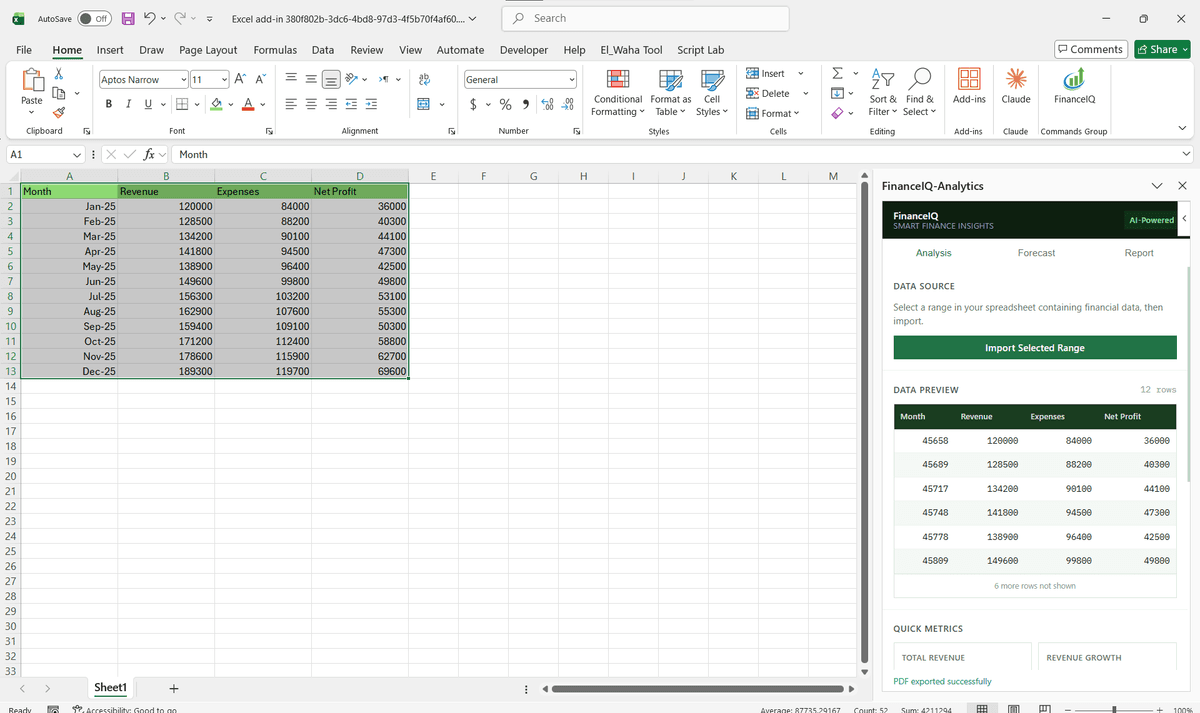
Driving Real Business
Value with Excel Add-ins Development
Don't just add features. Solve bottlenecks. Our custom solutions are engineered to reduce manual effort by up to 40% and ensure 100% data accuracy.
Cost Reduction
Automate repetitive tasks and eliminate manual data entry.
Native Experience
Add-ins look and feel like part of the original Microsoft app.
Centralized Deployment
Deploy instantly via Microsoft 365 Admin Center.
Data Security
Inherit Microsoft's enterprise-grade security protocols.
Our Tech Stack
The frameworks, cloud platforms, and AI models we build Office add-ins and integrations on.




Industry-Specific Solutions
We tailor our Microsoft development expertise to meet the unique compliance and workflow requirements of your sector.

Finance & Banking
We build excel automation add-ins for financial modeling, financial reporting, budget consolidation, and accounting reconciliation used by analysts and finance teams at banks, accounting firms, and private equity firms.

Manufacturing
Real-time inventory and demand-planning data analysis tools in Excel, connected to WMS and ERP systems so planners always work from live figures.

Healthcare
HIPAA-aligned Excel add-ins for clinical data reporting, patient metric tracking, and regulatory submission preparation, with Azure AD SSO for controlled access.

Legal
Excel extensions for matter billing, timesheet automation, and compliance tracking that integrate with your document management and billing platforms.










What Our Clients Say
Join 100+ businesses who trust us with their critical Office automation and enterprise add-in development.
"Amazing work. The Excel plugin was built exactly around what I needed and has made the process much faster and easier to manage. Communication was clear throughout, the turnaround was quick, and the final result worked well without needing constant back and forth. They clearly understood the problem."
"MSOfficeAddin truly exceeded expectations in software development, showcasing impeccable professionalism and profound code expertise. Working with the team was a breeze thanks to excellent cooperation and punctual delivery. HIGHLY recommend their services!"
"MSOfficeAddin delivered a flawless software project with incredible attention to detail and professionalism. Working with the team was a breeze as they were consistently responsive and cooperative, all while demonstrating EXCELLENT language fluency. 👍"
Frequently asked questions
How to add a data analysis add-in in Excel?
How to add an add-in to Excel?
How to create an Excel add-in?
What are COM add-ins?
How do I hire an Excel add-in developer?
Can you build Excel add-ins for financial reporting or accounting?
Do you integrate Excel add-ins with external APIs and CRM systems?
Can you add AI or OpenAI features to an Excel add-in?
What is a UDF and can you build custom Excel functions?
Will a custom add-in slow down large workbooks?
Can the same add-in behave differently for different teams?
Explore Related Solutions
Complement your current ecosystem with our other specialized Microsoft development services.
Start your Excel Add-ins Development project
Our experts are ready to help you architect and deploy your enterprise solution. Schedule a technical discovery call today.
Talk to us
info@msofficeaddin.com
Response within 24 hours
Consultation
Book a technical discovery call
Global Support
Working with clients across North America, Europe, and Asia.
We've pre-filled this form for the Excel Add-ins Development service. Feel free to edit any field before sending.