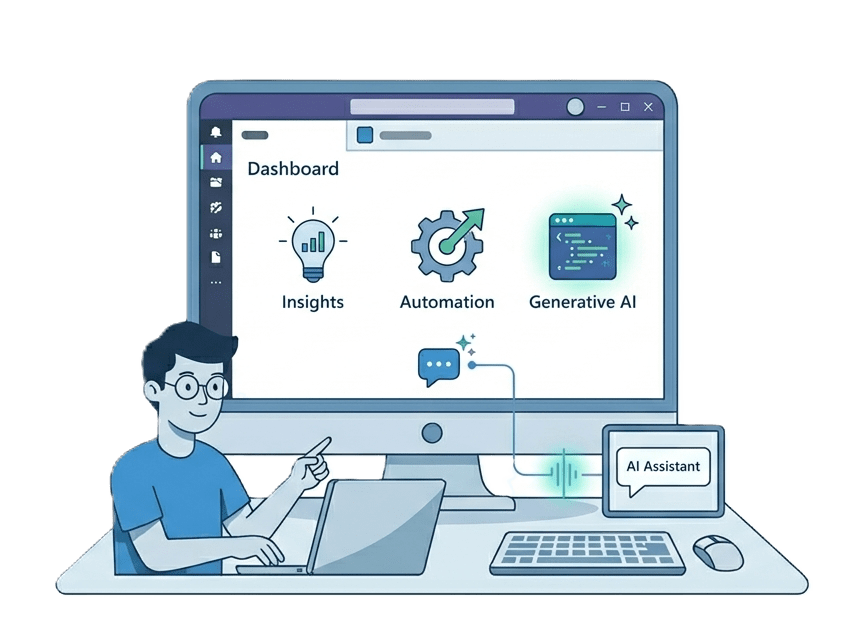
AI-Powered Office Add-ins
We build Office add-ins that integrate the OpenAI and ChatGPT APIs into Excel, Word, Outlook, and PowerPoint, so AI runs inside the apps your team already uses. Hire our developers to add GPT-powered formula help, writing assistance, slide generation, and email drafting without sending anyone to a separate tool.
AI-Powered Office Add-ins Overview
AI-powered Office add-ins call the OpenAI or ChatGPT APIs from inside Microsoft 365 apps, so generative AI runs where your team already works. We build them for Excel, Word, Outlook, and PowerPoint. Concrete use cases include GPT-powered formula suggestions in Excel, an AI writing assistant in the Word task pane, automated slide content and speaker notes in PowerPoint, and an email drafting assistant in Outlook. Every AI add-in we build ships production-ready, and we handle AppSource publishing so it reaches users through the Microsoft marketplace. This service is for businesses that want AI capabilities inside the tools their teams use every day rather than another standalone app, and the demand is real: OpenAI's API processes over 10 million requests per day across enterprise integrations. Connecting these models securely — Azure OpenAI endpoints, function calling, and API key management — is its own discipline, handled by our AI integration for Office add-ins service. We build these alongside our app-specific work, including Excel add-ins, Word add-ins, PowerPoint add-ins, and Outlook add-ins. AI add-ins that call OpenAI are different from Microsoft Copilot extensions, which extend Microsoft 365 Copilot itself; see our Microsoft Copilot extensions service.
An underwriting team at a specialty insurer had quietly started pasting claim summaries into a public chatbot to draft coverage position letters. The drafts were decent; the compliance exposure was not. Rather than ban the habit, the insurer asked us to give it a sanctioned home. We built a Word task pane assistant backed by Azure OpenAI in their own subscription, with the app registration and permissions handled through our Microsoft Entra setup work, so prompts never leave their tenant and every generation is logged with the file and author. Underwriters kept the drafting speed they had discovered on their own, legal got an audit trail, and the public-chatbot habit died out within weeks because the in-document version was simply closer to hand.
A custom AI build is worth it when the model needs your context: house style, policy wording, live data from your systems. If people just need general drafting help, a Copilot license per user is simpler than custom work, and if you want Microsoft 365 Copilot itself answering from your data, that is Copilot extension territory rather than an Office.js project. We scope which of the three actually fits before writing code.

AI-Powered Office Add-ins Expertise
Our AI-Powered Office Add-ins Means:
- RAG (Retrieval-Augmented Generation) Architecture
- Prompt Engineering for Office Contexts
- Vector Database Integration
- Azure AI Search and Indexing
- LLM Token Optimization and Security
Custom AI-Powered Office Add-ins Services
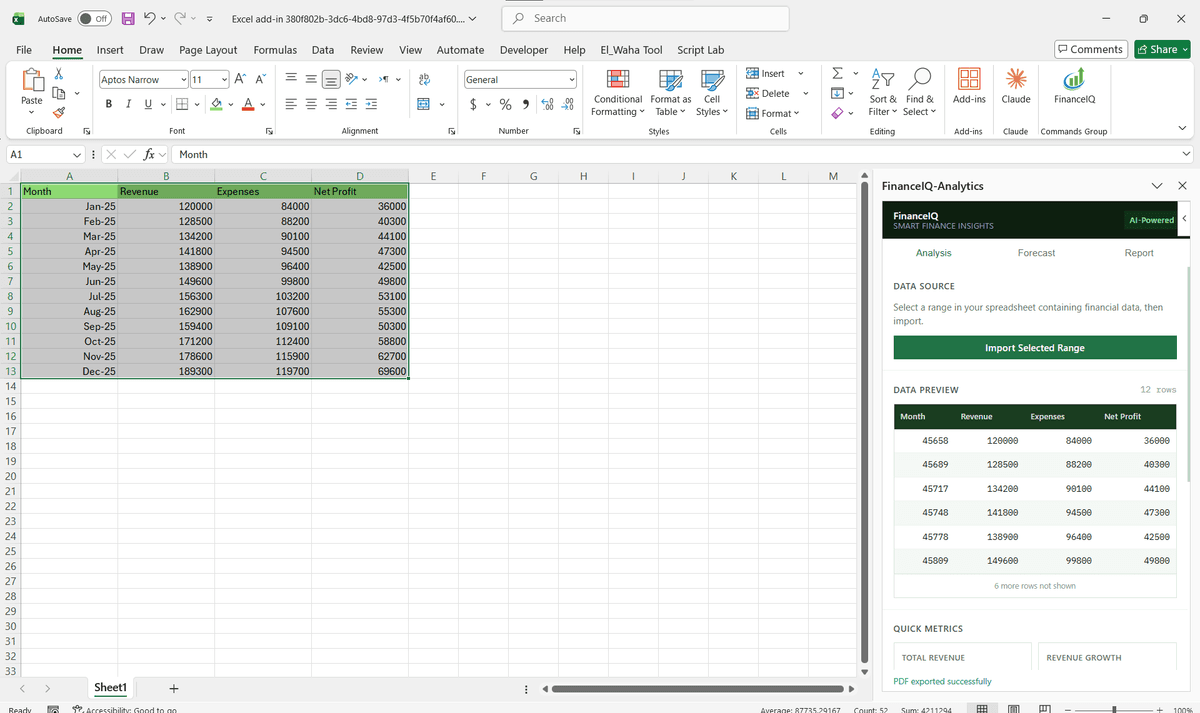
ChatGPT-powered Excel formula suggestions and data analysis
Enterprise-grade chatgpt-powered excel formula suggestions and data analysis solutions built on the latest Microsoft frameworks.
AI writing assistant task pane for Word documents
Enterprise-grade ai writing assistant task pane for word documents solutions built on the latest Microsoft frameworks.
Automated slide content and speaker notes generation in PowerPoint
Enterprise-grade automated slide content and speaker notes generation in powerpoint solutions built on the latest Microsoft frameworks.
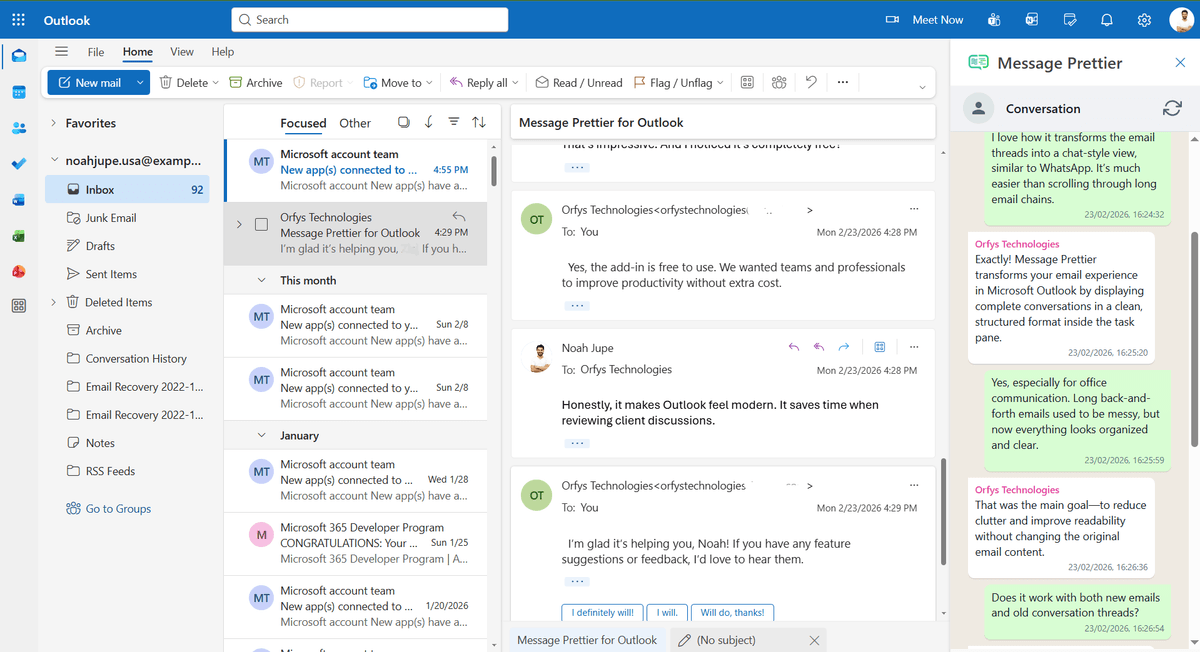
Outlook email drafting and reply suggestions via the OpenAI API
Enterprise-grade outlook email drafting and reply suggestions via the openai api solutions built on the latest Microsoft frameworks.
Custom GPT prompt engineering for domain-specific tasks
Enterprise-grade custom gpt prompt engineering for domain-specific tasks solutions built on the latest Microsoft frameworks.
OpenAI API key management and secure server-side proxying
Enterprise-grade openai api key management and secure server-side proxying solutions built on the latest Microsoft frameworks.
Streaming responses inside Office task panes for real-time output
Enterprise-grade streaming responses inside office task panes for real-time output solutions built on the latest Microsoft frameworks.
Fine-tuned model integration for industry-specific add-ins
Enterprise-grade fine-tuned model integration for industry-specific add-ins solutions built on the latest Microsoft frameworks.
Types of AI-Powered Office Add-ins We Build
OpenAI API Integration
Connect Excel, Outlook, and Word add-ins to GPT-4o and GPT-4 Turbo via a secure server-side proxy that keeps your API key out of the browser.
Azure OpenAI Service
Deploy AI models inside your Azure subscription across 12 available regions for data residency compliance, with no prompts or completions sent to shared infrastructure.
Copilot Extensibility
Build declarative agents and API plugins that surface your business data inside Microsoft 365 Copilot across Teams, Outlook, and SharePoint.
RAG Pipeline in Office
Attach a vector database and retrieval layer to any Office add-in so the AI answers questions against your internal documents, not just its training data.
On-Premise LLM Support
Route add-in API calls to self-hosted models via Ollama or Azure private endpoints for environments where no data can leave the corporate network.
Prompt Engineering for Office
Purpose-built prompt templates that account for token limits, document structure, and Office.js output format, reducing hallucination and improving first-pass accuracy.
Featured Solutions & Interfaces
Driving Real Business
Value with AI-Powered Office Add-ins
Don't just add features. Solve bottlenecks. Our custom solutions are engineered to reduce manual effort by up to 40% and ensure 100% data accuracy.
Cost Reduction
Automate repetitive tasks and eliminate manual data entry.
Native Experience
Add-ins look and feel like part of the original Microsoft app.
Centralized Deployment
Deploy instantly via Microsoft 365 Admin Center.
Data Security
Inherit Microsoft's enterprise-grade security protocols.
Our Tech Stack
The frameworks, cloud platforms, and AI models we build Office add-ins and integrations on.








Industry-Specific Solutions
We tailor our Microsoft development expertise to meet the unique compliance and workflow requirements of your sector.

Legal
GPT-4o contract summarization, clause extraction, and compliance review in Word, cutting document review time by up to 80%.

Finance & Banking
Natural language forecast generation and AI-driven financial report drafting inside Excel, connected to live ERP data.

HR & Recruiting
Azure OpenAI-connected Word add-ins that generate personalized onboarding documents and policy summaries from a single template in under 90 seconds.









What Our Clients Say
Join 100+ businesses who trust us with their critical Office automation and enterprise add-in development.
"Amazing work. The Excel plugin was built exactly around what I needed and has made the process much faster and easier to manage. Communication was clear throughout, the turnaround was quick, and the final result worked well without needing constant back and forth. They clearly understood the problem."
"MSOfficeAddin truly exceeded expectations in software development, showcasing impeccable professionalism and profound code expertise. Working with the team was a breeze thanks to excellent cooperation and punctual delivery. HIGHLY recommend their services!"
"MSOfficeAddin delivered a flawless software project with incredible attention to detail and professionalism. Working with the team was a breeze as they were consistently responsive and cooperative, all while demonstrating EXCELLENT language fluency. 👍"
Frequently asked questions
Can you build an Office add-in that uses ChatGPT or OpenAI?
What can an AI-powered Excel add-in actually do?
Can you add an AI writing assistant to Microsoft Word?
How do you handle OpenAI API key security in an Office add-in?
Can an AI add-in work with a fine-tuned or custom GPT model?
Which Office applications can have AI features added via an add-in?
Can we cap what the AI features spend on API calls?
What happens when the model gives a wrong answer inside a document?
Explore Related Solutions
Complement your current ecosystem with our other specialized Microsoft development services.
Start your AI-Powered Office Add-ins project
Our experts are ready to help you architect and deploy your enterprise solution. Schedule a technical discovery call today.
Talk to us
info@msofficeaddin.com
Response within 24 hours
Consultation
Book a technical discovery call
Global Support
Working with clients across North America, Europe, and Asia.
We've pre-filled this form for the AI-Powered Office Add-ins service. Feel free to edit any field before sending.