Message Prettier Outlook Add-in
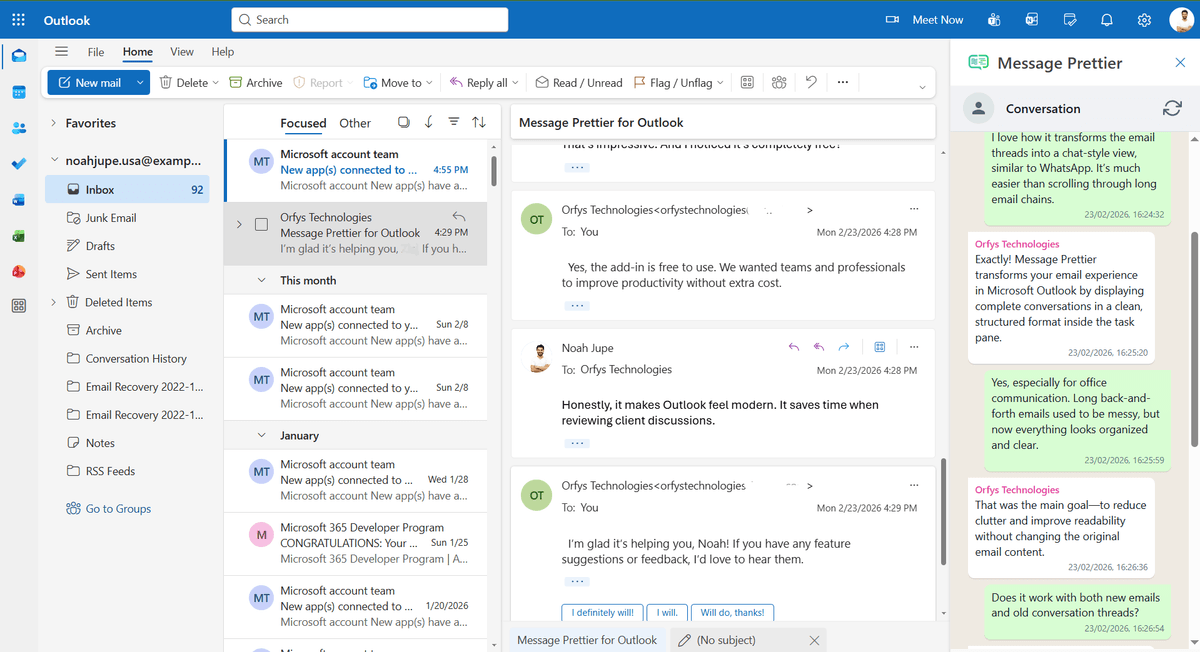
Our published Outlook plugin that turns cluttered email threads into a clean, chat-style conversation view, free to install on Microsoft AppSource.
The Challenge
Long email threads in Outlook get harder to read with every reply, because each new message re-quotes everything above it. People who handle high email volume lose the thread, re-read the same paragraphs, and scroll past walls of duplicated text just to find the latest response. Native Outlook has no built-in way to collapse a noisy conversation into a clean, chat-style timeline, so most users either live with the clutter or paste messages into a separate tool to make sense of them. That is exactly the gap people are searching to fill when they look for an Outlook plugin or extension that simply makes email easier to read.
Our Solution
We designed and published Message Prettier, an Outlook add-in built with Office.js and React that reads the full conversation thread, strips redundant quoted content, and renders each message as a timestamped chat bubble in chronological order. It installs as a lightweight task pane, so the same Outlook plugin runs across classic and new Outlook on the web, Windows, Mac, and mobile from a single codebase. Every thread is parsed locally inside the user's mailbox with no data leaving the Outlook client, which clears the privacy bar most enterprises set for any third-party Outlook extension. Message Prettier is published and certified on Microsoft AppSource and free to install, so any Microsoft 365 user can add it in a couple of clicks with no VBA, macros, or admin setup. The technical decision that shaped everything else was where parsing happens. Running thread analysis on a server would have made the parser easier to update, but it would also have meant email content leaving the mailbox, and that single fact fails most enterprise security reviews before a demo is ever booked. So quoted-text detection runs entirely client-side inside the task pane, which forced a stricter approach to performance: parsing is incremental and results are cached per conversation, keeping long threads responsive on the web client. The second choice was boring on purpose: plain Office.js and React with no experimental APIs, because AppSource certification and the spread of Outlook clients punish clever dependencies. That is a large part of why one codebase still covers classic and new Outlook across desktop, web, and mobile.
Want the same for your team? Talk to our Outlook add-in development team. You can also download Message Prettier on AppSource.
Key Results
- Published and certified on Microsoft AppSource as a free Outlook add-in
- Runs on classic and new Outlook across web, desktop, and mobile from one Office.js codebase
- Parses every thread locally with zero external data transmission, meeting enterprise privacy requirements
- Installs in a couple of clicks with no VBA, macros, or admin configuration
Screenshots
Technologies Used
Areas of Work
Have a Similar Project?
Tell us what you need and get a free technical consultation within 24 hours.
Get a Free Quote