Power BI Integration for Excel Add-ins
Surface Power BI datasets and visuals inside Excel add-ins so your team works with live data without leaving their spreadsheet. We build the connector, you own the workflow.

Integration at a Glance
250+ Projects
delivered across integration builds
7 Integration Types
SAP, AI, CRM, Power BI and more
5+ Years
building Office add-in integrations
Free Discovery Call
to scope your integration project
What We Build Into Your Power BI Integration
Power BI Dataset Access
We connect Excel add-ins to Power BI datasets via the REST API so users can query measures, dimensions, and KPIs directly from a spreadsheet.
Live Visual Embedding
We embed Power BI report visuals inside Excel task panes so your team sees current charts and dashboards without leaving their spreadsheet.
XMLA Endpoint Queries
For direct dataset access, we connect via the XMLA endpoint using DAX queries, which are faster and more flexible than the REST API for analytical workloads.
Azure AD Authentication
We implement Microsoft identity / Azure AD OAuth so users authenticate with their existing Microsoft 365 credentials and see only the datasets they have permission to access.
Scheduled Data Refresh
We build scheduled refresh triggers inside the add-in so Excel data stays current with your Power BI dataset without users manually clicking refresh.
Write-Back to Power BI Dataflows
We connect Excel add-ins to Power BI dataflows so curated spreadsheet data flows back into your reporting layer automatically.
How the Integration Project Works
- 1
Dataset & Permission Review
We confirm which Power BI datasets your users need access to, validate Power BI Pro or Premium licences, and map the data fields the add-in will surface in Excel.
- 2
Azure AD Auth Setup
We implement Microsoft identity OAuth so users authenticate with their existing Microsoft 365 credentials and the add-in respects Power BI dataset permissions.
- 3
Query Layer Build
We build the REST API or XMLA query layer that pulls the right measures, dimensions, and KPIs from your Power BI dataset into Excel ranges.
- 4
Add-in Build & Visual Embedding
We build the Office.js task pane, embed Power BI visuals where required, and implement scheduled refresh so data stays current without manual user action.
- 5
Testing & Deployment
We test across dataset sizes and permission levels, deploy via Microsoft Admin Center, and document the Power BI workspace configuration for your team.
Our Tech Stack
The frameworks, cloud platforms, and AI models we build Office add-ins and integrations on.



















Industry-Specific Solutions
We tailor our Microsoft development expertise to meet the unique compliance and workflow requirements of your sector.

Finance & Banking
We bring Power BI financial dashboards into Excel so analysts model against live reporting data.

Professional Services & Consulting
We bring Power BI utilisation and margin data into Excel so partners track delivery in real time.

Healthcare
We surface Power BI operational metrics inside Excel under permission-aware access controls.
Featured Solutions & Interfaces
When the dashboards were perfect and nobody used them
The BI team had built forty dashboards; the finance team exported all of them to Excel anyway. That standoff, at a 900-store convenience retail group, is what the FP&A director asked us to end. Interviews made the reason obvious: analysts did not want to look at numbers, they wanted to compute with them, and a dashboard is a dead end for that.
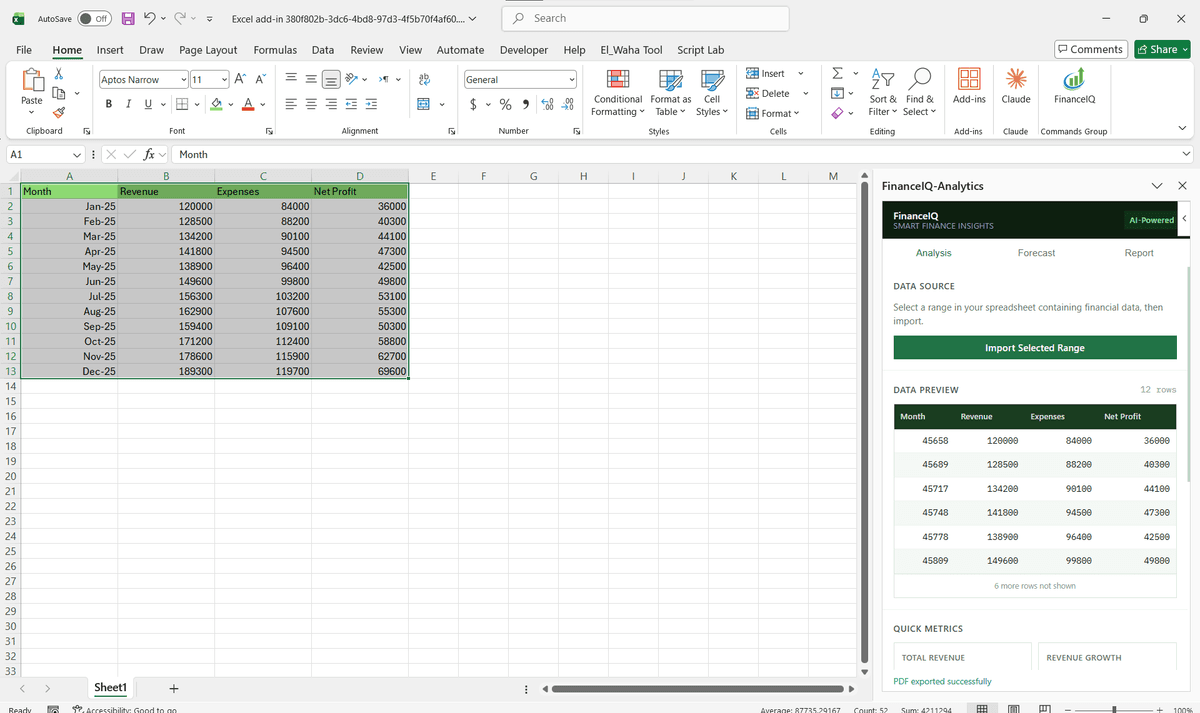
We built a task pane that runs DAX queries against the governed datasets and lands results in the analysts' own models as refreshable ranges, so margin figures in a store-closure model now come from the same certified measures the executive dashboard shows. The BI team stopped being asked for extracts. The detail that won finance over was small: every pulled range carries a note recording the dataset, the measure, and the refresh time, which ended the 'whose number is this' argument in month-end reviews. It is the pattern most of our finance sector work follows.
Try the native path first
Excel already ships Analyze in Excel and live connected tables for Power BI, and for straightforward pivot exploration against one dataset they are enough; we tell teams to exhaust them before commissioning anything. Custom work starts paying when you need filtered measures landed in specific model ranges, visuals embedded beside the source, write-back into dataflows, or refresh behaviour the native tools do not offer. If your organisation has not yet agreed which datasets are certified, fix that governance question first.
Power BI Integration: Common Questions
Yes. We connect Excel add-ins to Power BI datasets via the REST API or XMLA endpoint so users query live measures and dimensions directly from their spreadsheet.
Ready to Connect Power BI to Microsoft 365?
We scope every integration project on a free discovery call. No commitment, just a clear picture of what the build involves and what it will cost.