QuickBooks Integration for Excel Add-ins
Pull QuickBooks invoices, expenses, customers, and financial reports into Excel without exporting. We build Excel add-ins that connect to QuickBooks Online via API so your finance team works with live data.

Integration at a Glance
250+ Projects
delivered across integration builds
7 Integration Types
SAP, AI, CRM, Power BI and more
5+ Years
building Office add-in integrations
Free Discovery Call
to scope your integration project
What We Build Into Your QuickBooks Integration
Live QuickBooks Data in Excel
Pull invoices, expenses, payments, and account balances from QuickBooks into Excel on demand so your finance team always works with current numbers.
Invoice & Expense Sync
Query specific invoice ranges, expense categories, or date periods directly from Excel without exporting from QuickBooks or reformatting downloaded files.
Customer & Vendor Data Access
Pull customer lists, vendor records, and outstanding balances into Excel for reporting, reconciliation, or analysis without leaving your spreadsheet.
Financial Report Templates
We build pre-structured Excel templates that populate automatically from QuickBooks, covering P&L, cash flow, and aged receivables, so reports take one click instead of an hour.
Write-Back to QuickBooks
Create invoices, update records, or categorise transactions in QuickBooks directly from Excel, for finance teams that prefer to work in spreadsheets.
Intuit OAuth 2.0 Auth
We implement Intuit's official OAuth 2.0 flow so users connect their QuickBooks account securely and the add-in handles token refresh without re-authentication prompts.
How the Integration Project Works
- 1
QuickBooks Data Mapping
We map which QuickBooks objects your team needs in Excel, such as invoices, expenses, customers, vendors, accounts, and transactions, and confirm your QuickBooks Online plan supports API access.
- 2
Intuit OAuth Setup
We register the integration with Intuit's developer platform, implement OAuth 2.0, and establish a tested connection to your QuickBooks Online company before development starts.
- 3
Template & Field Design
We design the Excel structure, including which data lands in which columns, how date ranges are filtered, and how report templates are laid out, before writing a single line of add-in code.
- 4
Add-in Build & Testing
We build the Excel task pane and test against your live QuickBooks data, including edge cases like multi-currency, voided invoices, and large transaction volumes.
- 5
Deployment & Finance Handover
We deploy via Microsoft Admin Center and provide your finance team with a usage guide covering data refresh, date range filtering, and write-back steps if applicable.
Our Tech Stack
The frameworks, cloud platforms, and AI models we build Office add-ins and integrations on.



















Industry-Specific Solutions
We tailor our Microsoft development expertise to meet the unique compliance and workflow requirements of your sector.

Finance & Banking
We pull QuickBooks invoices, expenses, and ledgers into Excel so accountants close the books without manual exports.

Professional Services & Consulting
We connect QuickBooks billing and project costs to Excel so firms track margin per engagement.

Real Estate
We surface QuickBooks job costs, invoices, and payments in Excel so project managers track budgets.

Healthcare
We connect QuickBooks billing and expense data to Excel for practice finance teams under controlled access.
Featured Solutions & Interfaces
Sixty client files and one January
January broke the process the same way every year. A nine-person bookkeeping practice managed about sixty QuickBooks Online client files, and year-end meant opening each one, exporting trial balances and transaction lists, and pasting them into the firm's working papers: a fortnight of work compressed into deadline season. The senior partner wanted the fortnight back.
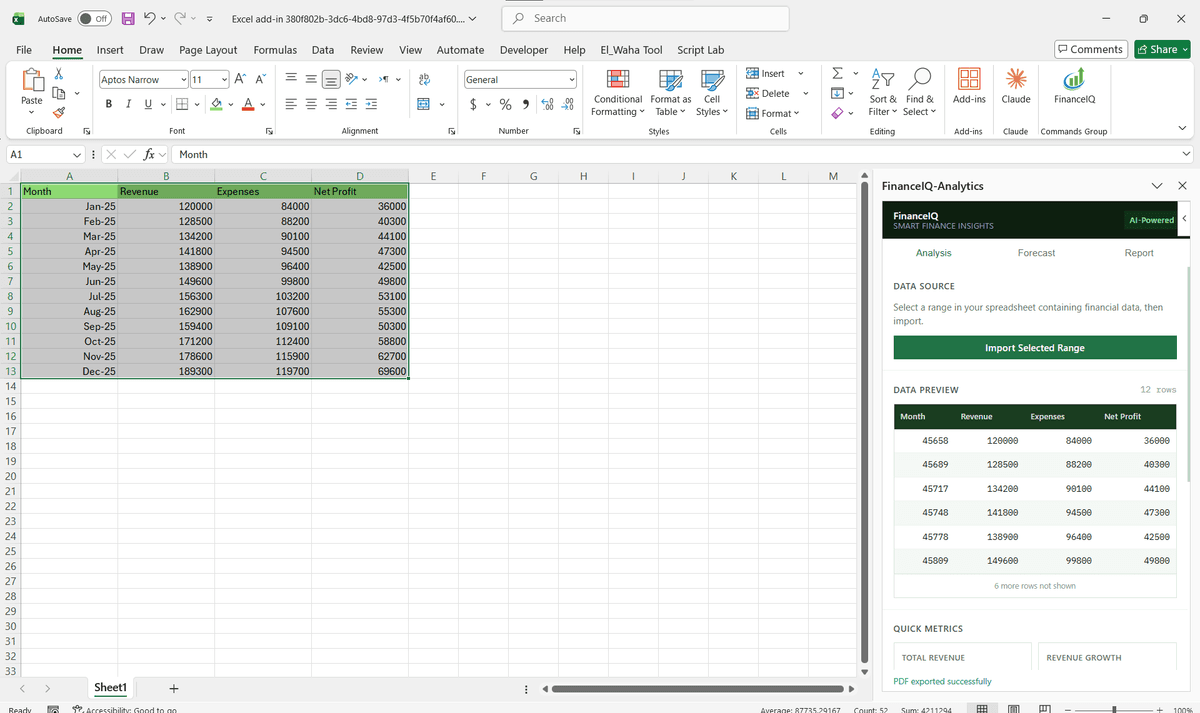
We built an Excel tool authorised against each client company through Intuit's OAuth flow, so a staff member picks a client from a dropdown and the working paper template fills itself: trial balance, aged receivables, and unreconciled transactions flagged in their own tab. Multi-client batch refresh runs overnight before review days. The firm recovered most of the fortnight, but the partner's favourite outcome is quieter. Junior staff now start from clean, current numbers, so review conversations are about judgement calls rather than copy-paste errors. The template side reuses our Excel development patterns for professional services firms.
When the built-in reports are all you need
If the reports you need match what QuickBooks Online already produces, its own report centre and scheduled exports cost nothing and need no project. Custom work is justified by volume and shape: many client files, working papers with a firm-specific structure, or write-back that creates records from a spreadsheet. QuickBooks Desktop is a different conversation entirely, since it lacks the cloud API, and we scope it separately rather than pretending the same build applies.
QuickBooks Integration: Common Questions
Yes. We connect Excel add-ins to QuickBooks Online via the Intuit API so your team queries invoices, expenses, and account balances directly in Excel without any export or manual formatting step.
Ready to Connect QuickBooks to Microsoft 365?
We scope every integration project on a free discovery call. No commitment, just a clear picture of what the build involves and what it will cost.