Custom API Integration for Office Add-ins
Connect any REST, GraphQL, or SOAP API to your Excel, Outlook, or Word add-in. We handle auth, error handling, and data mapping so your add-in talks to any backend system.

Integration at a Glance
250+ Projects
delivered across integration builds
7 Integration Types
SAP, AI, CRM, Power BI and more
5+ Years
building Office add-in integrations
Free Discovery Call
to scope your integration project
What We Build Into Your Custom API Integration
REST API Integration
GET, POST, PUT, PATCH, DELETE. We handle all REST methods and map responses to Excel ranges, Outlook fields, or Word content controls.
GraphQL Support
We write typed queries and mutations against GraphQL APIs and pipe results into Office add-ins with proper loading and error states.
SOAP & Legacy Endpoints
Older enterprise systems often expose SOAP APIs. We parse WSDL files and build the SOAP client layer your add-in needs.
OAuth 2.0 & SSO
We implement OAuth 2.0 authorization code flows, PKCE, and Microsoft SSO so users authenticate once and the add-in handles tokens automatically.
Data Mapping & Transformation
API responses rarely match what Excel expects. We transform, flatten, and map data structures so the right values land in the right places.
Rate Limiting & Retry Logic
We build exponential backoff, request queuing, and user-facing progress indicators so your add-in handles API limits gracefully.
How the Integration Project Works
- 1
API Review
We review your API documentation, test endpoints, and identify any auth, CORS, or rate-limit constraints that will affect the add-in build.
- 2
Auth Implementation
We implement the right authentication method for your API, whether OAuth 2.0, API keys, or SSO, and confirm tokens are handled securely within the Office add-in context.
- 3
Data Mapping
We map your API response structure to the Office data model, whether Excel ranges, Outlook fields, or Word content controls, so output lands exactly where it should.
- 4
Add-in Build & Testing
We build the full Office.js add-in, test against live and staging API endpoints, and cover error states including timeouts, empty responses, and auth failures.
- 5
Deployment
We deploy the add-in via Microsoft Admin Center for internal rollout or prepare it for AppSource submission if wider distribution is required.
Our Tech Stack
The frameworks, cloud platforms, and AI models we build Office add-ins and integrations on.



















Industry-Specific Solutions
We tailor our Microsoft development expertise to meet the unique compliance and workflow requirements of your sector.

Finance & Banking
We connect trading, payment, and reporting APIs to Excel so finance teams pull live figures on demand.

Manufacturing
We integrate carrier, tracking, and inventory APIs so logistics teams see shipment status inside Office.

Healthcare
We connect scheduling, billing, and records APIs through secure auth that protects sensitive health data.

Professional Services & Consulting
We link practice management and billing APIs so teams update records without leaving Excel or Outlook.
Manufacturing
We integrate production and ERP APIs so operations teams pull live output and stock figures into Office.
Featured Solutions & Interfaces
A dispatch system, an undocumented API, and Excel
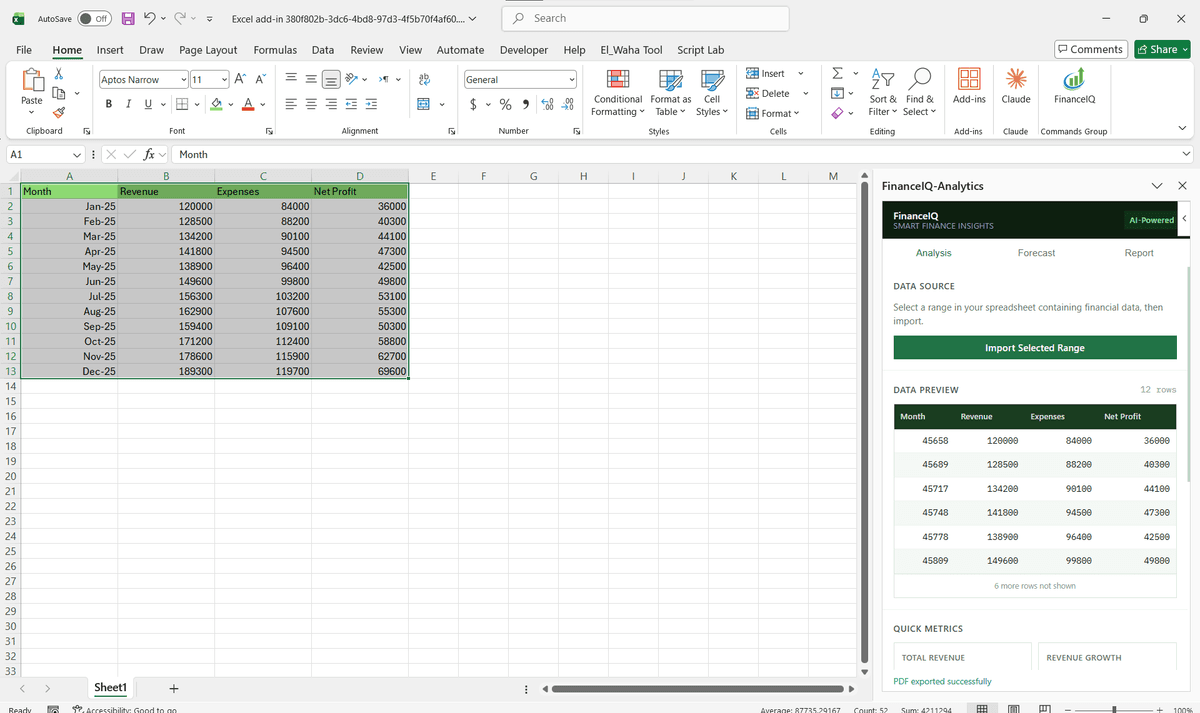
Our planners need the routing system inside Excel: that was the whole brief. The client was a regional freight company running 300 trucks, whose in-house dispatch platform had an API nobody had written down. We spent the first week with their one backend developer, mapping endpoints by reading controller code, then built the task pane against what we found.
Load boards now pull into the planners' workbooks every twenty minutes, and rate confirmations push back with a single click. The awkward part was authentication, since the internal API only spoke a custom header token; we wrapped it behind a small OAuth 2.0 layer so tokens rotate properly and nothing sensitive sits in the workbook. Planners kept the spreadsheets they had tuned for years. The dispatch system finally reached them there, instead of the other way round.
When custom API work is the wrong answer
If your target system already ships a supported Office connector, or a Power Query source covers the read-only reporting you need, start there and spend nothing. Custom work earns its keep when data must flow both ways, when the API is internal or awkward, or when the workflow inside Excel matters as much as the data itself. And if there is no API at all, we say so plainly: we do not build on screen scraping.
Custom API Integration: Common Questions
Yes. We connect add-ins to internal APIs hosted on private networks, VPNs, or corporate intranets. We handle CORS configuration, network routing, and any auth requirements your IT team specifies.
Ready to Connect Custom API to Microsoft 365?
We scope every integration project on a free discovery call. No commitment, just a clear picture of what the build involves and what it will cost.