
Microsoft Office Add-ins Development
MSOfficeAddin builds custom Microsoft Office add-ins for Excel, Outlook, Word, PowerPoint, SharePoint, and Teams using Office.js and the Microsoft 365 platform. From CRM-integrated Outlook add-in workflows to financial-automation Excel tools, our certified developers deliver AppSource-ready, cross-platform solutions for enterprise teams across the US, UK, and Australia.
Microsoft Office Add-ins Development Overview
MSOfficeAddin is a specialist Microsoft Office add-ins development company serving enterprise clients across the US, UK, Australia, and worldwide. We build secure, scalable Office.js solutions for every Microsoft 365 application: Excel, Outlook, Word, PowerPoint, SharePoint, and Teams. Each one integrates with your ERPs, CRMs, and internal APIs without disrupting how your team already works.
Every excel add-in, Outlook add-in, and ms word add-ins project we deliver is built to Microsoft's recommended Office.js architecture and validated against AppSource certification requirements from day one. That keeps projects clear of last-minute rewrites and certification delays. We also handle full VSTO and COM add-in migration to the modern web-based standard, giving legacy tooling a cross-platform future.
From initial scoping through post-launch Microsoft 365 compatibility maintenance, MSOfficeAddin acts as your long-term development partner, not a one-off shop.

Microsoft Office Add-ins Development Expertise
Our Microsoft Office Add-ins Development Means:
- Cross-platform Office.js across Windows, macOS, Web, and iPad
- Legacy VSTO to Office.js modernization
- Complex CRM and ERP system integrations via Microsoft Graph API
- Security-first, AppSource-compliant development
- High-performance, lightweight Office.js architecture
Custom Microsoft Office Add-ins Development Services
Cross-platform by default: every Microsoft Office add-in runs on Windows, Mac, and the web from a single Office.js codebase
Enterprise-grade cross-platform by default: every microsoft office add-in runs on windows, mac, and the web from a single office.js codebase solutions built on the latest Microsoft frameworks.
AppSource-ready from commit one, built to Microsoft's validation guidelines and targeting first-attempt certification
Enterprise-grade appsource-ready from commit one, built to microsoft's validation guidelines and targeting first-attempt certification solutions built on the latest Microsoft frameworks.
Enterprise integrations come standard: Office.js, Azure AD SSO, Microsoft Graph API, and ERP/CRM connectivity included
Enterprise-grade enterprise integrations come standard: office.js, azure ad sso, microsoft graph api, and erp/crm connectivity included solutions built on the latest Microsoft frameworks.
Fluent UI task panes and ribbon commands that look and behave like first-party Microsoft products
Enterprise-grade fluent ui task panes and ribbon commands that look and behave like first-party microsoft products solutions built on the latest Microsoft frameworks.
Excel add-in, Outlook add-in, Word, PowerPoint, SharePoint, and Teams development under one team
Enterprise-grade excel add-in, outlook add-in, word, powerpoint, sharepoint, and teams development under one team solutions built on the latest Microsoft frameworks.
VSTO and COM add-in migration to the modern Office.js web standard
Enterprise-grade vsto and com add-in migration to the modern office.js web standard solutions built on the latest Microsoft frameworks.
AI-powered add-ins with OpenAI and Azure AI integrations
Enterprise-grade ai-powered add-ins with openai and azure ai integrations solutions built on the latest Microsoft frameworks.
Ongoing Microsoft 365 compatibility maintenance and AppSource update management
Enterprise-grade ongoing microsoft 365 compatibility maintenance and appsource update management solutions built on the latest Microsoft frameworks.
Types of Microsoft Office Add-ins Development We Build
Excel Add-in Development
Custom excel add-ins for financial automation, real-time API data injection, native spreadsheet formulas, and ribbon customization, all built cross-platform with Office.js.
Outlook Add-in Development
Outlook add-in solutions for CRM sync, email triage automation, and calendar workflows that run inside the inbox without leaving Outlook.
Word Add-in Development
Ms word add-ins for contract generation, document assembly, clause libraries, and compliance automation connected to your backend systems.
PowerPoint Add-in Development
Branded template automation, live chart injection, and data-driven slide generation delivered as a native PowerPoint task pane add-in.
SharePoint Add-in Development
Custom SharePoint extensions that surface business logic, automate document approval flows, and integrate with Microsoft Graph and your line-of-business apps.
Teams App Development
Messaging extensions, bots, and task modules that bring your workflow directly into Teams conversations, built on the same Office.js and Microsoft Graph stack.
Featured Solutions & Interfaces
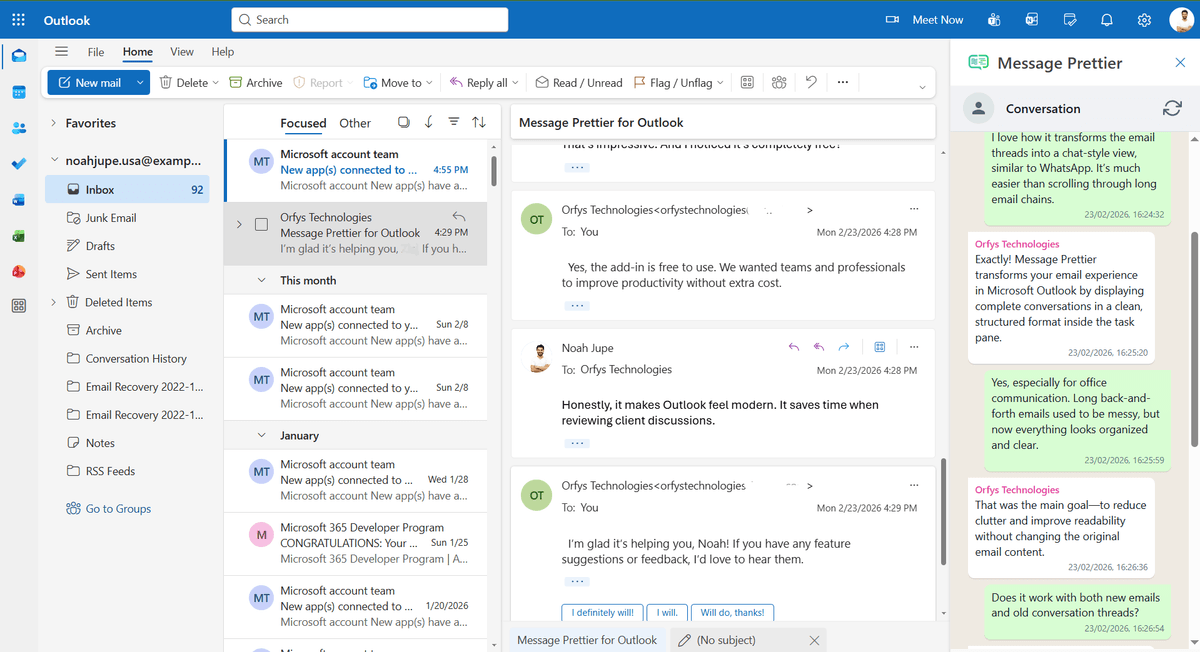
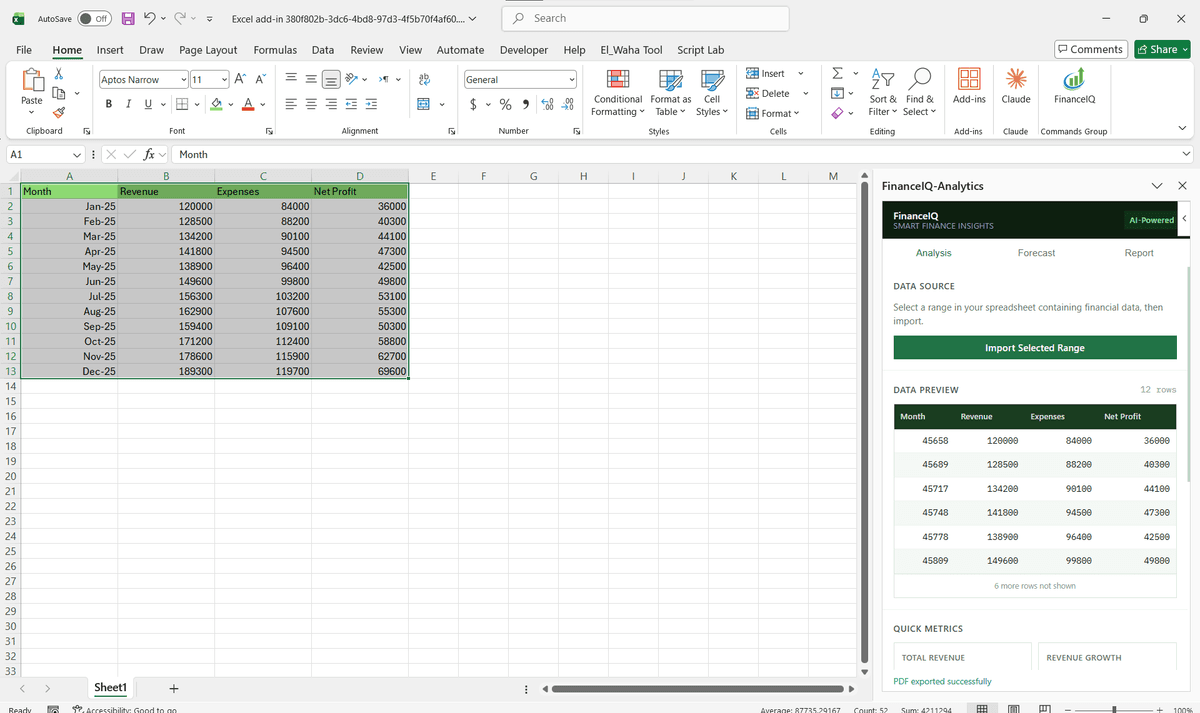
Driving Real Business
Value with Microsoft Office Add-ins Development
Don't just add features. Solve bottlenecks. Our custom solutions are engineered to reduce manual effort by up to 40% and ensure 100% data accuracy.
Cost Reduction
Automate repetitive tasks and eliminate manual data entry.
Native Experience
Add-ins look and feel like part of the original Microsoft app.
Centralized Deployment
Deploy instantly via Microsoft 365 Admin Center.
Data Security
Inherit Microsoft's enterprise-grade security protocols.
Our Tech Stack
The frameworks, cloud platforms, and AI models we build Office add-ins and integrations on.




Industry-Specific Solutions
We tailor our Microsoft development expertise to meet the unique compliance and workflow requirements of your sector.

Finance & Banking
Automate complex Excel financial models, audit trails, and multi-sheet reporting pipelines.












What Our Clients Say
Join 100+ businesses who trust us with their critical Office automation and enterprise add-in development.
"Amazing work. The Excel plugin was built exactly around what I needed and has made the process much faster and easier to manage. Communication was clear throughout, the turnaround was quick, and the final result worked well without needing constant back and forth. They clearly understood the problem."
"MSOfficeAddin truly exceeded expectations in software development, showcasing impeccable professionalism and profound code expertise. Working with the team was a breeze thanks to excellent cooperation and punctual delivery. HIGHLY recommend their services!"
"MSOfficeAddin delivered a flawless software project with incredible attention to detail and professionalism. Working with the team was a breeze as they were consistently responsive and cooperative, all while demonstrating EXCELLENT language fluency. 👍"
Frequently asked questions
What is the difference between a VSTO add-in and an Office.js add-in?
How long does it take to build a custom Microsoft Office add-in?
How much does it cost to develop a custom Office add-in?
What is the difference between an Office add-in and an Office plugin?
Do Microsoft Office add-ins work on Mac and Office on the Web?
Our Microsoft Office Add-ins Development Services
Specialized add-in development for every Microsoft 365 app. Explore each service below.
Start your Microsoft Office Add-ins Development project
Our experts are ready to help you architect and deploy your enterprise solution. Schedule a technical discovery call today.
Talk to us
info@msofficeaddin.com
Response within 24 hours
Consultation
Book a technical discovery call
Global Support
Working with clients across North America, Europe, and Asia.
We've pre-filled this form for the Microsoft Office Add-ins Development service. Feel free to edit any field before sending.